Instructors please use this updated link: AccessMSU Instructor Login
We are excited to introduce AccessMSU, an innovative and student-focused data system that modernizes how accommodations are requested, viewed, and managed at the Resource Center for Persons with Disabilities (RCPD).
Note: Students who registered with RCPD prior to the new system launch on June 1, 2026, please use the Currently Working with RCPD link above.
What has changed:
- Students do NOT need to email PDFs of Accommodation Letters to instructors anymore
- Students log into AccessMSU to share their Accommodation Letters with instructors directly
- Instructors receive email notifications when Accommodation Letters are sent, including new added accommodations mid-semester
- Instructors should update RCPD syllabus statements or course policies to reflect the new Accommodation Letter sharing process. Check out our Faculty & Departmental Resources page for updated syllabus language.
What has not changed:
- Students and instructors should still engage in interactive conversations about how accommodations will be implemented for individual courses
- Instructors must accept accommodations throughout the semester. Please contact the student’s Access Specialist with questions or extenuating circumstances.
Below, we’ve included instructions on how to use AccessMSU as a student, employee, and instructor. Each section includes PowerPoint presentations with more in-depth instructions and guiding screenshots.
Students
Submit Online Application
Formally identify as a student or employee with a physical, sensory, cognitive or psychological disability via the AccessMSU accommodation portal.
For step-by-step instructions with screenshots, please review our Student Guide – Getting Started PowerPoint. You can also access screen reader instructions for submitting your application.
- Login with your MSU credentials and select “Start New Application.”
Fill in your information and select “Create Application Draft” – your application will be saved in our system and you can return to it later if needed.
Note: Accommodations cannot be provided for draft applications. Please complete all steps to submit your application.
- Complete the “List of Questions” on the next page to provide further information which will help the RCPD pair you with the right Access Specialist.
- Save your application and proceed to uploading documentation. Our documentation page includes documentation standards and submission guidelines. Your form will not be reviewed until you have submitted documentation. If you do not have documentation to share, please contact us.
- Submit your application. You will receive a confirmation email.
*All required fields must be completed in order to submit the application. If you are unsure what to put please contact us.
You can review the status of your application at any time by logging back into AccessMSU.
Accommodation Letters should be shared with instructors at the start of each semester through AccessMSU by following the steps below.
How to send your Accommodation Letter
For step-by-step instructions with screenshots, please review our Student Guide – Sharing Accommodations PowerPoint.
- Log into your AccessMSU accommodation portal.
- Select "Add Request for x Class" under the Accommodation Request box for the current academic term.
- On the next page, you can select the classes you'd like to request accommodations for.
- If you plan to request all of your accommodations for all of your classes, or if you'd like to bulk request the same accommodations for all of your classes (versus individually choosing each accommodation for each class), select the "Apply the same accommodations to all selected courses" option. We recommend this option so you don’t miss sharing any of your accommodations.
- Select "Continue To Next Step" to move onto the accommodation selection page.
On the next page, you'll select all the accommodations you'd like for your classes. Choose the "Select All" option if you want to include all of your approved accommodation eligibility on your accommodation letter.
Note: If you did not select the "Apply all" option on the previous page, you will need to choose accommodations for each class individually.
- Before submitting your request, you must agree to the terms of requesting your accommodations by reading the agreement statement and selecting the checkbox next to the statement.
- To finally submit your request, select "Submit Request” and your accommodations will automatically be sent to your instructor(s).
How to send an updated Accommodation Letter:
- Log into your AccessMSU accommodation portal.
- Select "View Request Detail" within the "Accommodation Requests" box.
- Select “Modify Request” under each course for which you would like to send updated accommodation information.
- You will be sent to a new screen. Navigate to the "Accommodations" box where your new and current accommodations will appear next to checkboxes.
- Click all the un-selected accommodation checkboxes you would like to send to your instructor(s).
- Select "Update Request"
- Repeat this process for each class you would like to send updated accommodations. A new automated accommodation letter email will be sent to you and your instructor(s) that you can utilize to coordinate the implementation of the updated accommodations.
Employees
Formally identify as a student or employee with a physical, sensory, cognitive or psychological disability via the AccessMSU accommodation portal.
- Login with your MSU credentials and select “Start New Application.”
Fill in your information and select “Create Application Draft” – your application will be saved in our system and you can return to it later if needed.
Note: Accommodations cannot be provided for draft applications. Please complete all steps to submit your application.
- Complete the “List of Questions” on the next page to provide further information which will help the RCPD pair you with the right Access Specialist.
- Save your application and proceed to uploading documentation. Our documentation page includes documentation standards and submission guidelines. Your form will not be reviewed until you have submitted documentation. If you do not have documentation to share, please contact us.
- Submit your application. You will receive a confirmation email.
*All required fields must be completed in order to submit the application. If you are unsure what to put please contact us.
You can find screen reader instructions for submitting your application here.
Instructors
AccessMSU is a centralized accommodation portal where students’ accommodation letters are saved and available to their instructors.
For step-by-step instructions with screenshots, please review our Instructor Guide PowerPoint.
- Login to AccessMSU using your MSU credentials
- Acknowledge privacy policies
- View all accommodations on the “Overview” page
- In the yellow banner at the top, you can change the semester (ex: Fall 2026, Spring 2027)
- At the bottom, a listed view will provide all the students who have requested accommodations for your courses for the semester
- View specific student's accommodations
- To view the approved accommodations for each student, select “View” or “PDF” within each row and the student’s Accommodation Letter will generate
- All approved accommodations will be listed on the letter. Some accommodations include a description with implementation instructions
- The student's assigned Access Specialist and their contact information is listed at the bottom of the letter. If you have any questions about accommodation implementation, please reach out to the Access Specialist.
- If a student has accommodations that have an expiration date, they will be noted specifically.
- Export student data (Optional)
From the Overview page, you can create a spreadsheet of all your students and their accommodations, expand “Export Data: Student” and click on “Export Accommodation Requests”
View RCPD's Guide to Instructor Communications.
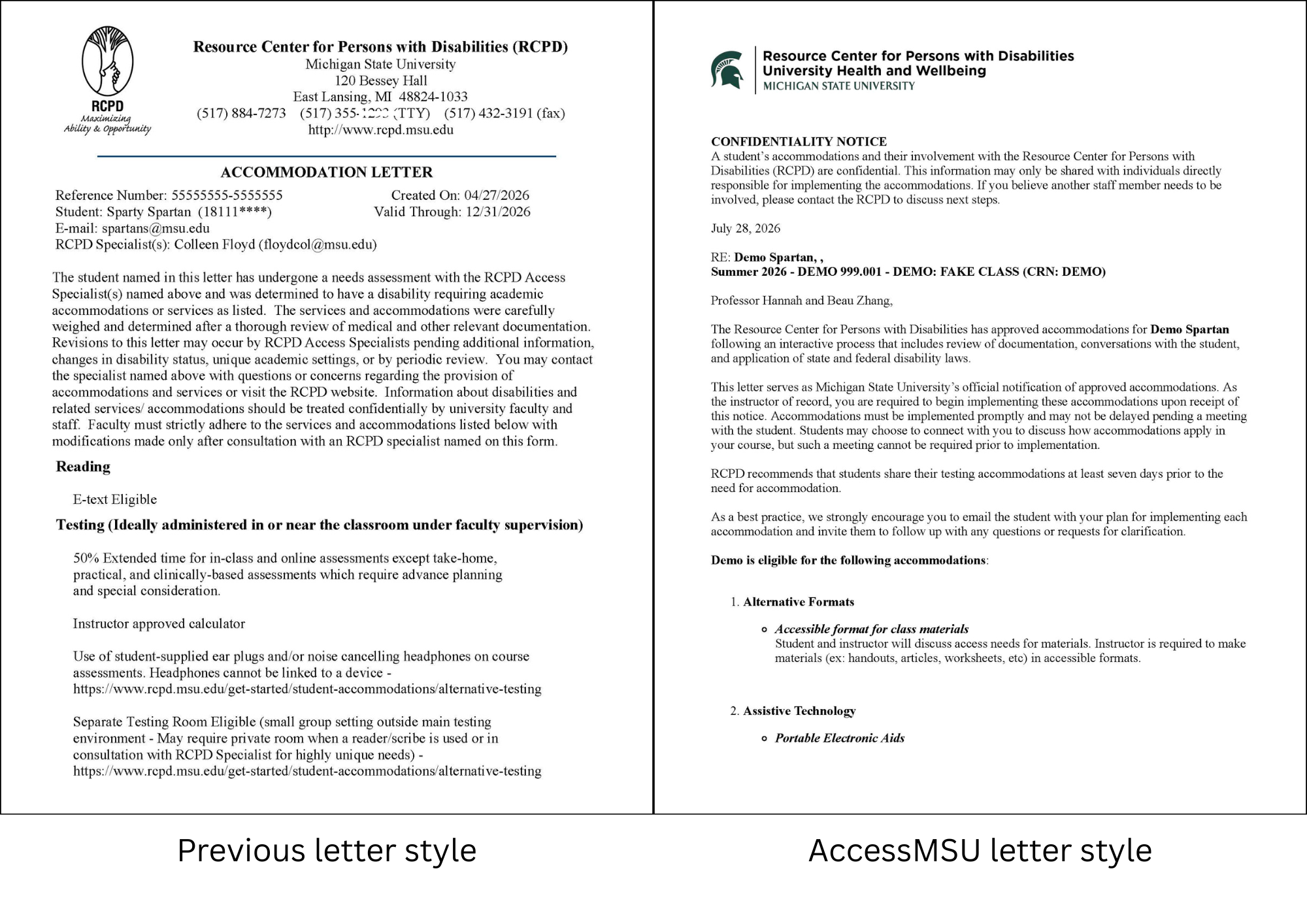
With RCPD's shift to AccessMSU, Accommodation Letters have a new look and are submitted to instructors via AccessMSU. As the MSU community shifts to this new process, you may receive Accommodation Letters a few different ways.
Prior to June 1, 2026, students sent instructors their Accommodation Letters via email. Students affiliated with RCPD prior to June 1, 2026 may have existing Accommodation Letters that were created and sent via RCPD's former process. If a student emails you their non-AccessMSU Accommodation Letter and it is still valid (check the "Valid Through" date at the top), accept the Letter and encourage the student to send their updated Accommodation Letter via AccessMSU.
You will receive Accommodation Letters from AccessMSU via email (note: these emails have the student's RCPD Access Specialist listed as the sender and come from notify@rcpd.msu.edu) and/or you can login to AccessMSU to utilize your customized instructor portal. For instructions about how to view Accommodation Letters via AccessMSU, please refer to the "How to View Accommodation Letters" drop-down tab on RCPD's AccessMSU resource page.
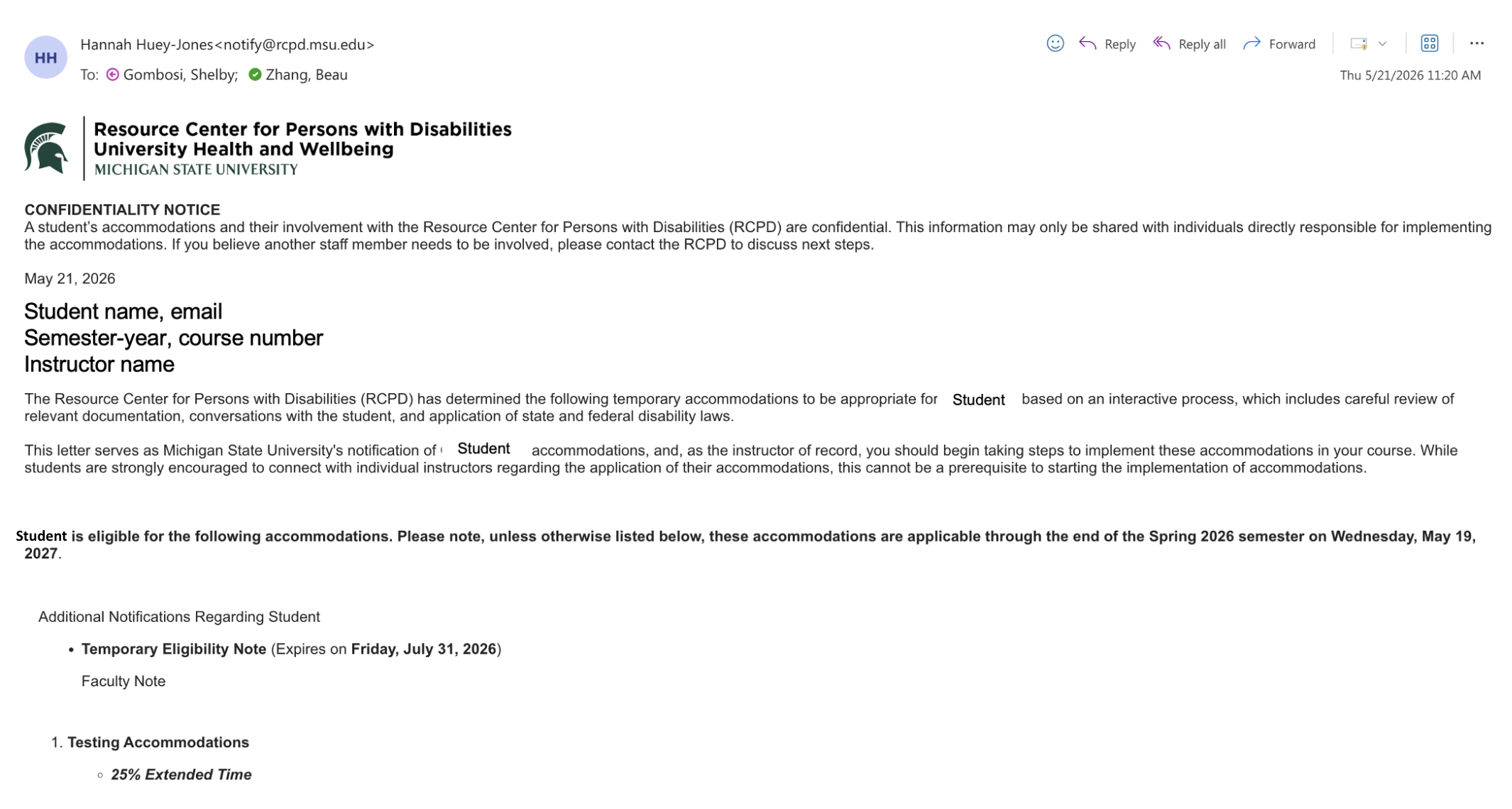
Example notification email from AccessMSU
What you can expect
- Accommodation letters are not sent until seven days before classes begin.
- Sender: [Access Specialist's name, from notify@rcpd.msu.edu]
- Subject line: [RCPD] Semester Year RCPD Accommodation Letter - Name - Course Number
- For example: [RCPD] Summer 2026 RCPD Accommodation Letter - Adam - PSY101
- To avoid missing a student’s accommodation, please make sure that emails from notify@rcpd.msu.edu and rcpd@msu.edu are not blocked or filtered.
- Emails may appear to come from Access Specialists but they are actually from one of these two email addresses.
- When students choose to update their accommodations, you will receive a new email with the new accommodation.
Model Syllabus Language
We encourage instructors to update their syllabi language and have provided a new model statement below:
Michigan State University is committed to providing access and inclusion in all programs, services and activities. Disabled persons should contact the Resource Center for Persons with Disabilities at 517-884-RCPD or by visiting RCPD’s website to request accommodations. Additional communication between the student, instructor, and RCPD specialist may be necessary to ensure an accessible classroom experience.
Please send your Accommodation Letter to me as soon as possible so I can ensure proper facilitation of accommodations. Accommodation Letters are generated and sent from within the AccessMSU student portal. Accommodations are not required to be provided prior to me receiving the letter. Students affiliated with RCPD prior to June 1, 2026 may have existing Accommodation Letters that were previously sent via email communication with instructors. I can still accept these letters, but you will need to also send your Accommodation Letter via AccessMSU.
Uploading your syllabi to AccessMSU allows students to download all of their syllabi from one place. View RCPD's Guide to Uploading Your Syllabus.
Steps to upload syllabus:
- Login to AccessMSU using your MSU credentials.
- Within the left-side navigation panel, navigate to Upload Syllabus.
- Select a class.
- Give your file a name (please name files clearly).
- Select the file you want to upload.
- Make sure that your syllabus is saved in an approved format.
- Ensure the file has been uploaded before leaving the page.
- Once your syllabus is successfully uploaded, students will be able to download the file directly from their AccessMSU student dashboard.
View RCPD's Guide to Add/Replace Instructors.
Steps to add/replace instructors:
- Login to AccessMSU using your MSU credentials.
- Within the left-side navigation panel, navigate to Add Instructors.
- Select a class.
- Select whether you wish to add additional instructor(s) or replace the current instructor(s).
- Enter the instructor’s full name and MSU email address.
- Only one instructor can be added at a time. If you need to add multiple instructors, complete these steps separately for each.
- Please allow up to 24 hours after approval for the newly added instructors to receive email notifications from the AccessMSU system.